Event security and stewarding on one live map, for a team that met this morning.
Event security and stewarding at a UK festival usually means a security contractor, a steward agency, a medical provider and volunteers working one site for one weekend. Sinkaos gives them the same map, the same incident record and a way in that takes a QR code, and it keeps queuing reports when forty thousand visitors are on the same mobile network.
Three companies, four radio channels and a site map printed last Tuesday.
Most event teams are assembled for the occasion. The security company brings its SIA-licensed supervisors and door supervisors, the steward agency brings sixty people it briefed by email, the medical provider has its own radio net, and event control sits in a cabin trying to keep up with all of them.
When something happens at a gate, the report arrives by radio, gets repeated by phone, and someone writes it in a log that nobody else can see. By the time security, stewards and medical have each heard their version, the queue has doubled. On Monday the organiser has to explain what happened to the council’s licensing team, the safety advisory group or the insurer, and the answer is scattered across notebooks and chat groups.
The network makes it worse: messaging apps lag and calls drop as the crowd arrives, which is exactly when the gates are busiest.
Day two of a riverside festival, from build-up to the debrief.
-
08:00The site goes on the mapGates, stages, first-aid points, exit routes, the control room and the crowd counters at each gate. Zones for each security sector, with the supervisor responsible for each one.ZonesSensors
-
10:30Stewards join at the briefingSixty stewards scan a QR code and land in the operation with the steward role. They see their sector, the exits and the people they report to. Nobody creates an account.Guest accessRoles
-
17:45The network slows downGates open and the cells fill. A steward’s report about a broken barrier waits in the phone’s queue and goes out a minute later, stamped with the time it was made.OfflineSync
-
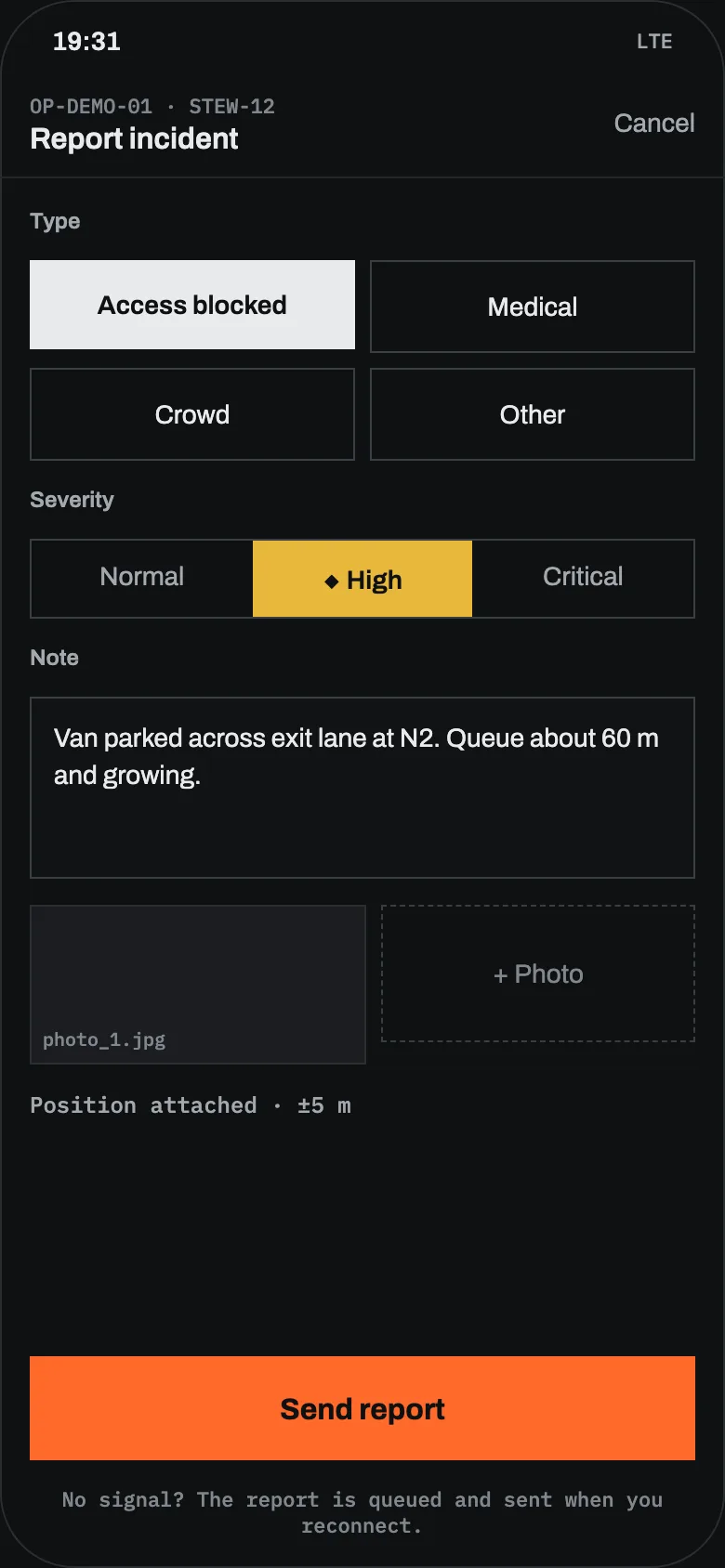
19:31A gate is blockedA steward reports a van across the exit lane at Gate N2, with a photo. The counter on N2 is already rising, and the incident opens next to it on the operator’s map.IncidentsObservations
-
19:36Security and stewards on one recordThe nearest security team gets a task to clear the lane, a steward redirects the queue. Medical can see the incident and decides it needs nothing from them.TasksLive location
-
MonGuests are gone, the record staysGuest access ended when the operation closed. The incident log and timeline export straight into the event report.TimelineExport
What event security and stewarding software should do for event control
A site map that is current
Gates, zones, stages, first aid, exit routes and temporary structures as objects on the map, moved when the site changes. Import the site plan from a PDF or image and place it with control points.
Onboarding in minutes
Guests join one operation by link or QR code, with a role that decides what they see. Their access ends on its own when the operation closes.
One incident, several teams
An incident holds its severity, owner, photos, tasks and timeline. Security, stewards and medical work on the same record, each with the access their role allows.
Who is closest
Supervisors and teams share their position while on duty, so the operator can see who can get to Gate N2 first. Members always see that they are sharing.
Crowd counters and cameras
Gate counters, sensors and cameras sit on the map next to the incidents they relate to. Thresholds can raise an alert before a queue becomes a crush.
A jammed network is survivable
Reports, photos and messages are saved on the phone and sent when a link appears. Low-bandwidth mode holds back photos so text and alerts go first.
Broadcasts that reach people
Send an operation-wide announcement, or mention a whole role such as every steward. Tasks need an acknowledgement, so the operator knows who has picked them up.
A record for Monday
Every report keeps two times: when it happened and when it arrived. Replay the day and export the timeline for the debrief, the authority or the insurer.
The same operation, seen from four roles
Kinds of event
Before you plan around it
It does not replace your radios
Radio is still the fastest way to say “stop”. Sinkaos is for what does not survive a radio call: positions, photos, incident records and a timeline you can read later.
It is not a dispatch system
Sinkaos is not a certified emergency dispatch or public warning system. Calls to 999 and your liaison with police, fire and ambulance follow the procedures in your event plan.
It cannot make the network faster
On a saturated network, messages are delayed. Sinkaos queues them instead of losing them. For large sites, a local field node over your own Wi-Fi is an option.
It does not write your plan
The event management plan, the crowd management decisions, the premises licence conditions and the question of which staff need an SIA licence are yours. Our guide to writing an event security plan is a good place to start.
What organisers ask us
Do stewards and volunteers need an account?
Can the security contractor and the steward agency see each other’s work?
Can we use the same setup next year?
What about the data of people we deal with on the day?
Does it work without any mobile network?
Got an event coming up? Run it on Sinkaos.
Tell us the date, the site and the size of the team. We reply within two working days.