EARLY ACCESS Sinkaos is in early access. Apply to join →
SHARED OPERATIONAL PICTURE

The live operational picture for teams in the field.

Sinkaos puts your people, incidents, tasks, messages and live data on one map. Every phone carries what its owner needs, so the work carries on when the network drops.
Request early access See how it works
Early access is free. We work with each team directly.
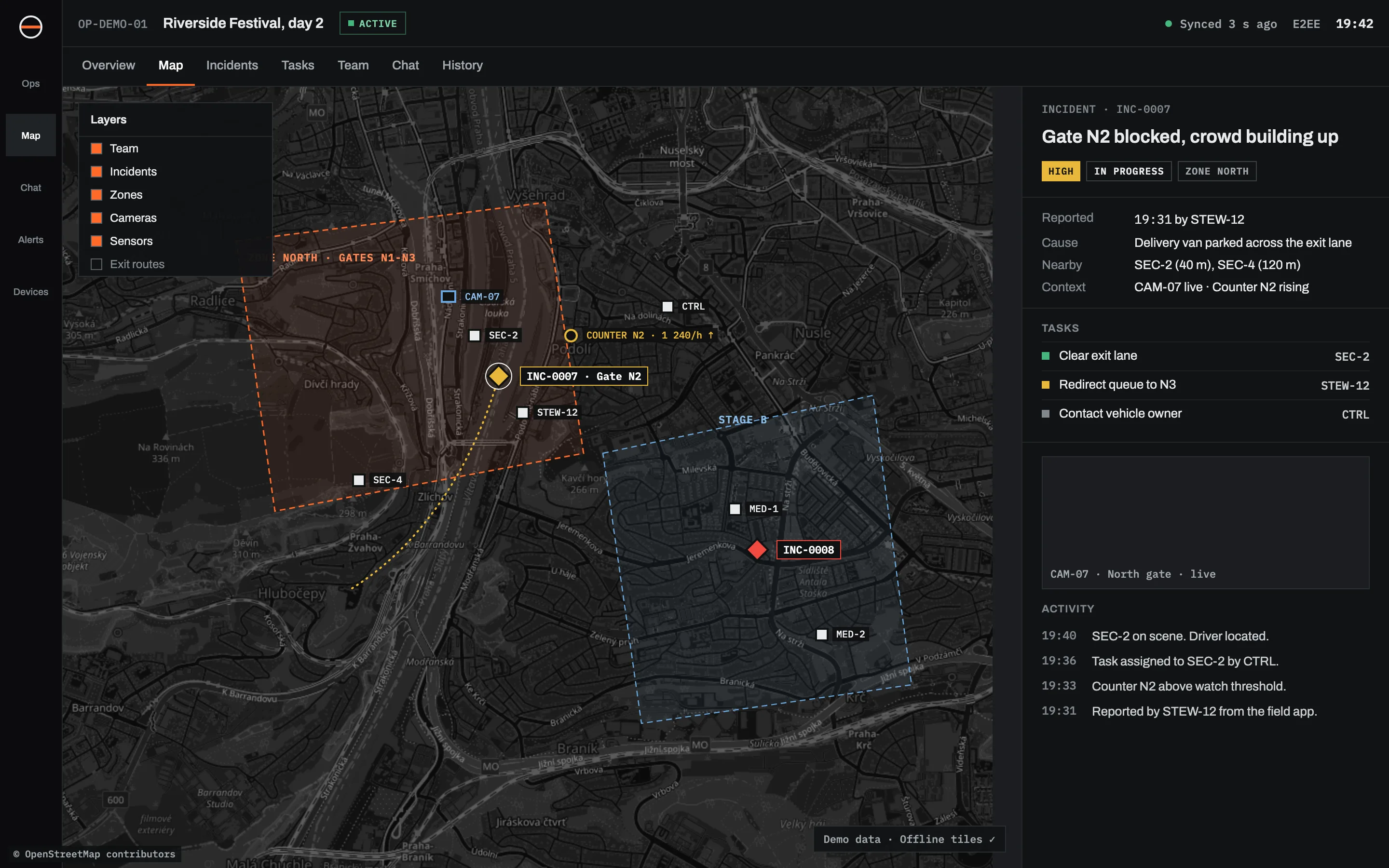
Operator view of the demo operation Riverside Festival, day 2: a map with Zone North, Stage B, teams, a camera and a people counter, and next to it incident INC-0007 "Gate N2 blocked" with its tasks, camera feed and activity.
The operator's view during a demo festival operation. All names and data are made up.
01 / ONE MAP

Stop asking on the radio where everyone is.

An operation in Sinkaos is one shared workspace for one event, response or site. Everything that happens in it lands on the same map.

Map
Zones, routes, gates and hazards, drawn once by whoever knows the ground and visible to everyone.
People and assets
Who is where, what they're doing and what they have with them. Positions catch up when signal comes back.
Incidents and tasks
An incident is a record with a place, a severity, an owner and a history. Tasks hang off it, not off a chat message.
Messages
Encrypted channels for the whole operation, for each incident, and person to person.
02 / ONE INCIDENT

19:31. A gate is blocked and the queue is growing.
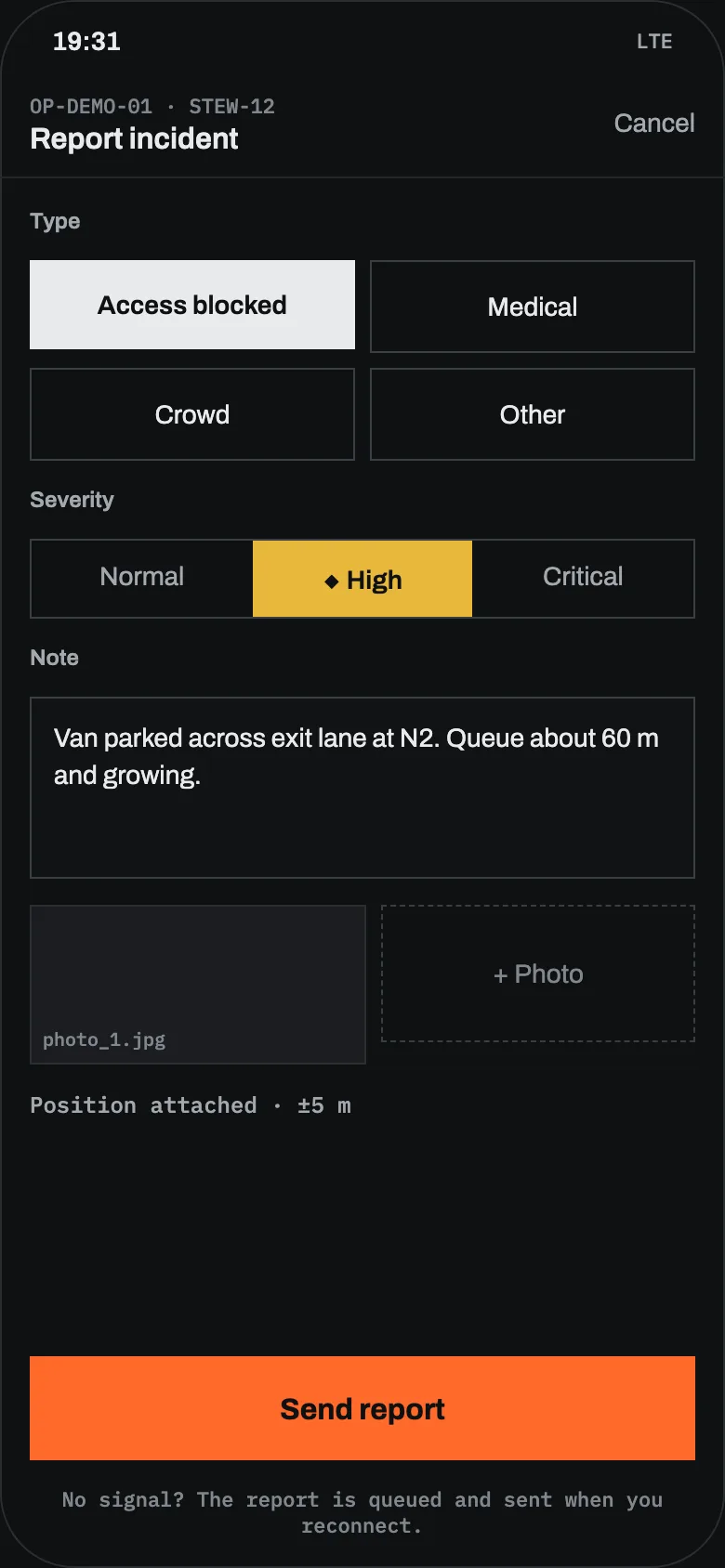
Field app on a steward's phone: the "Report incident" form with type "Access blocked", severity "High", a note about a van parked across the exit lane at N2, one photo and the position attached.
A steward's phone. Demo data.
  1. 19:31
    A steward reports it
    Type, severity, one photo, a short note. The position is attached. Three taps and it goes out, or waits in the queue if there is no signal.
  2. 19:32
    It appears on the map for everyone
    The operator sees a new incident at Gate N2. So does every team lead with access to Zone North.
  3. 19:33
    The context is already there
    The nearest security team is 40 m away. Camera 07 covers the gate. The crowd counter on N2 has just crossed its threshold.
  4. 19:36
    Tasks go out
    Clear the lane goes to SEC-2. Redirect the queue to N3 goes to the steward who reported it. Both see it on their phones.
  5. 19:40
    Resolved, and kept
    Driver found, van moved, queue moving. The incident closes with its whole timeline attached.
03 / OFFLINE FIRST

Planned at the desk. Carried in every pocket.

Before anyone leaves, the operator builds the plan. Each member's phone downloads its own mission pack. Once people are out there, nobody needs signal to see the map, their tasks or each other's last known positions.

  1. 01 PREPARE
    Plan the mission
    Area and sectors, zones, routes, roles, task templates, map layers and reference documents.
  2. 02 PACK
    One pack per person
    Offline maps, the plan, their tasks, the team list and the keys. Scoped to their role, nothing more.
  3. 03 OPERATE
    Signal or no signal
    Reports, photos, positions and messages are saved on the phone first and sent when a link appears.
  4. 04 CONVERGE
    The picture fills in
    As devices and sites reconnect, their changes arrive and slot into the timeline by the time they happened.
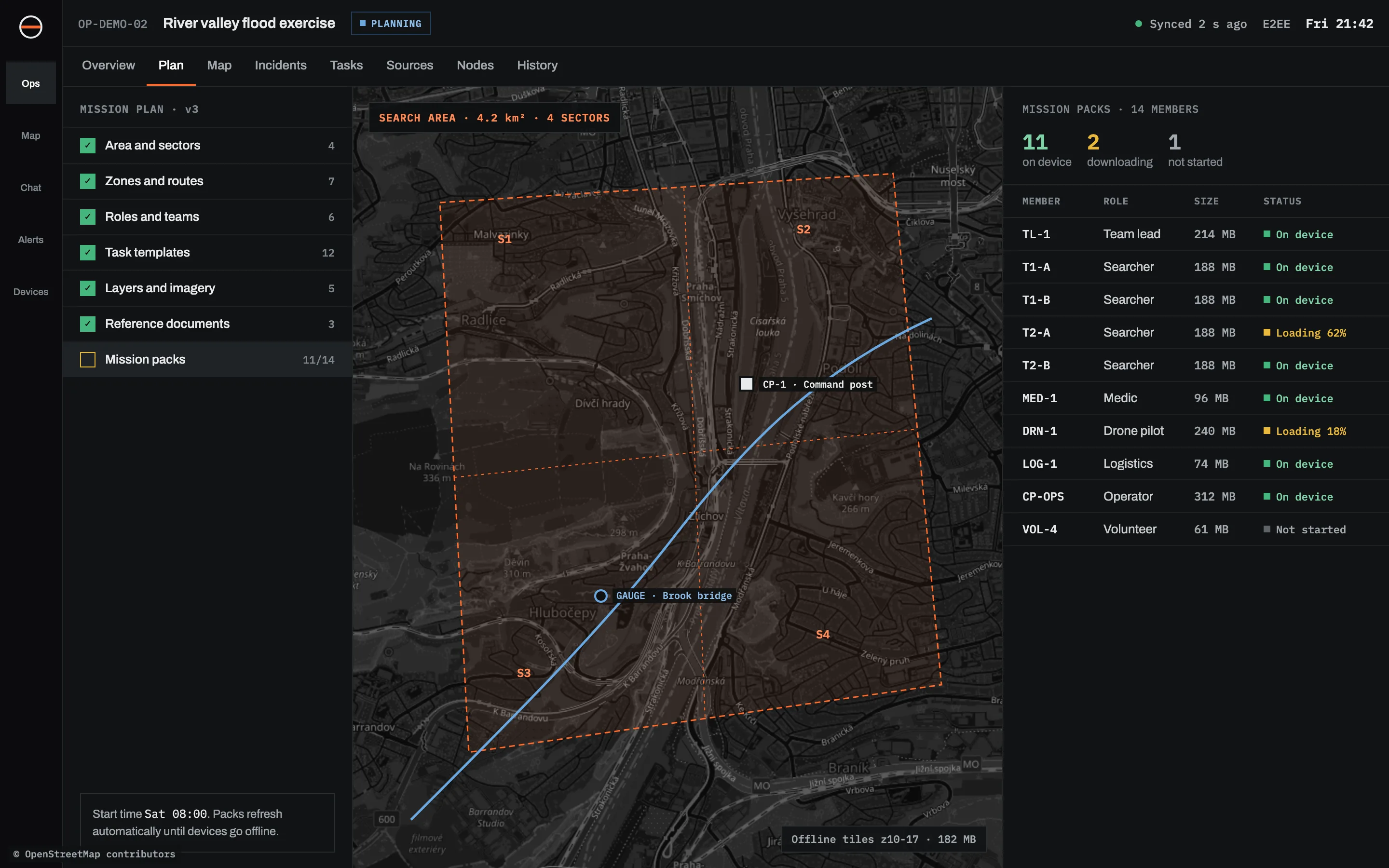
Mission plan of a demo flood exercise: a checklist of plan parts, a search area split into four sectors on the map, and a table of mission pack status for each member (on device, downloading, not started).
Mission plan with pack status for each member. Demo data.
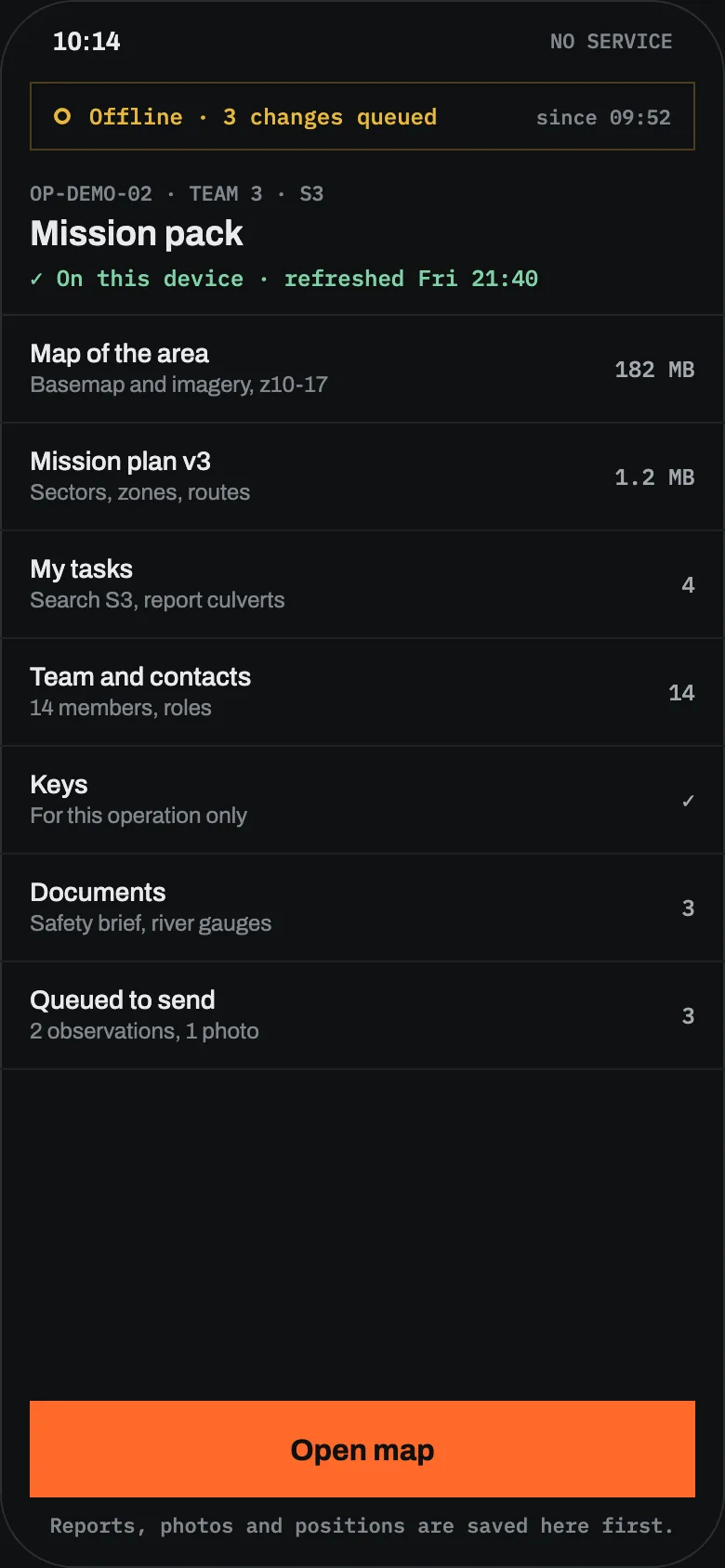
Mission pack on a searcher's phone with no service: offline map of the area, mission plan, own tasks, team and contacts, keys, documents and three changes waiting to send.
The same pack on a searcher's phone, with no signal.
04 / SEVERAL SITES

Each site keeps working on its own. They catch up when they can.

A command post in the valley can run its own Sinkaos node on a laptop, with the team connected over local Wi-Fi. Headquarters runs another. When a link exists, even a slow satellite one, the nodes exchange what changed.

Every report keeps two times: when it happened and when it arrived. Late reports go onto the timeline where they belong, so the operator sees what actually happened in what order.
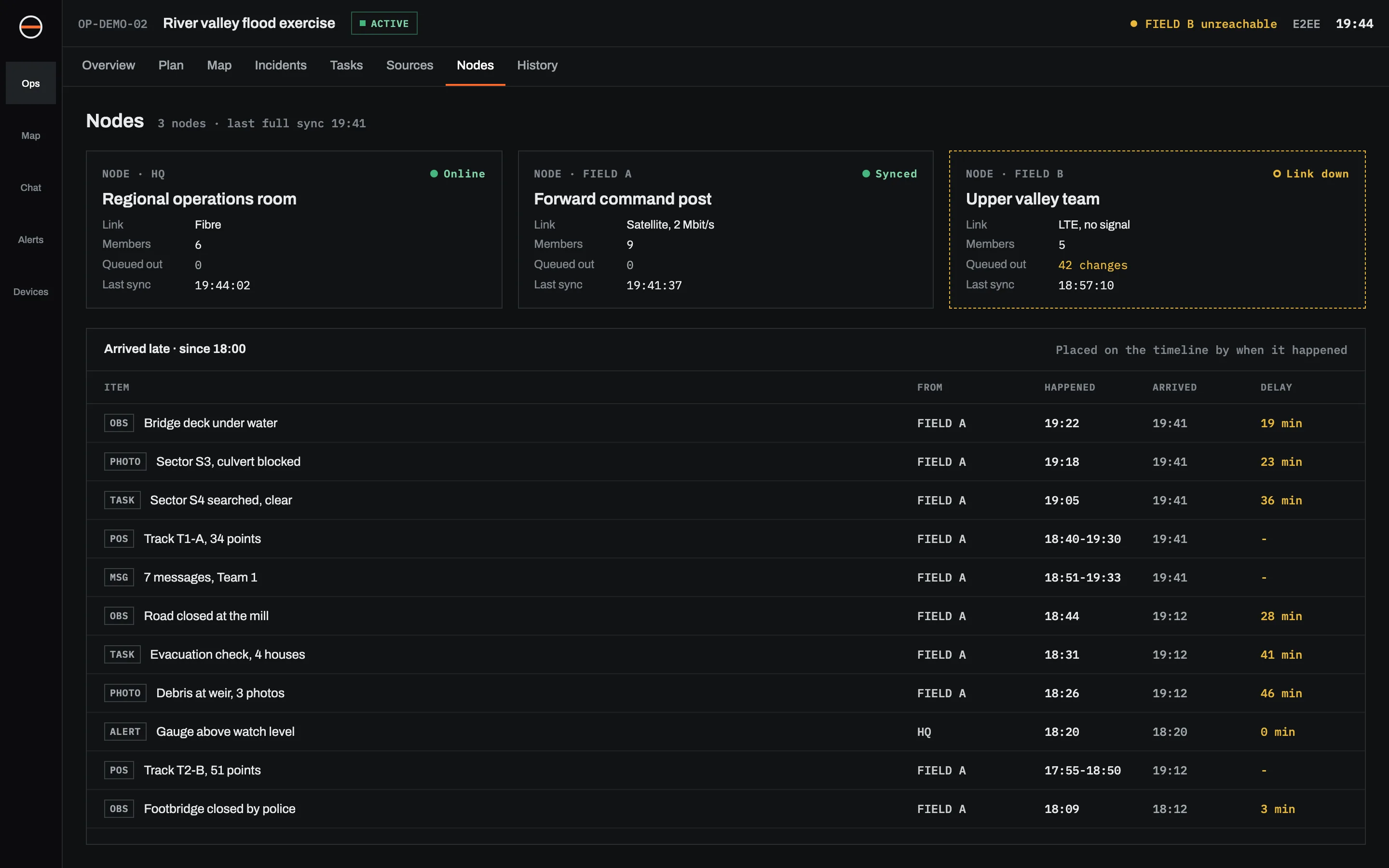
NODE · HQOnline
Regional operations room
Sees everything that has reached it from every site.
NODE · FIELD ASynced 19:41
Forward command post
Laptop node on a satellite link. Nine people on local Wi-Fi.
NODE · FIELD BLink down
Upper valley team
Working normally on its own. 42 changes will go out when the link returns.
Nodes screen: three nodes (HQ online, FIELD A synced over satellite, FIELD B with link down and 42 changes queued) above a list of reports that arrived late, each with the time it happened, the time it arrived and the delay.
Node status and reports that arrived late. Demo data.
05 / LIVE CONTEXT

Bring in the cameras, gauges and forecasts you already rely on.

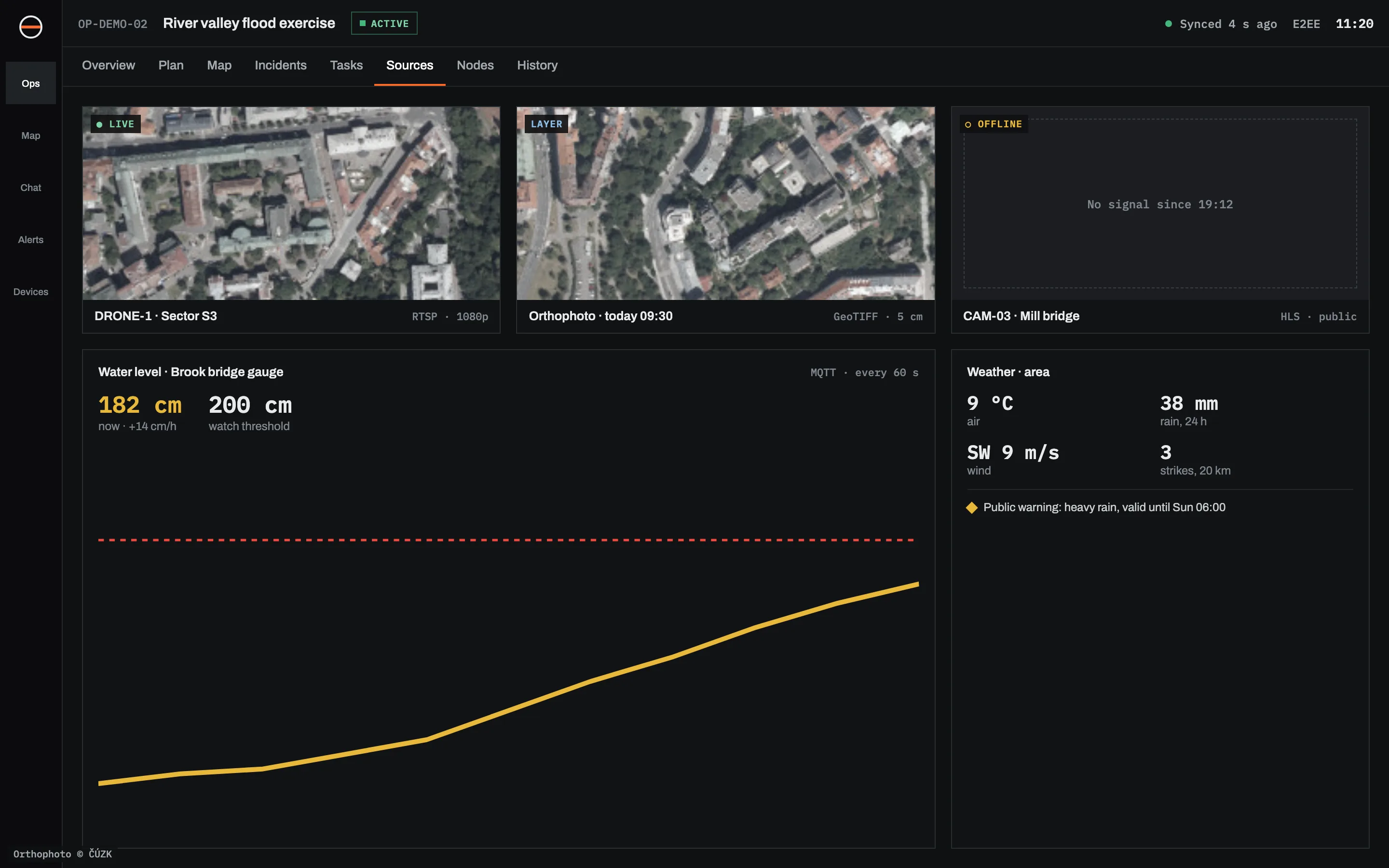
They sit on the same map as the team, and you can attach them to an incident. A rising river gauge can open an alert on its own.
Cameras and drones
Site cameras, public webcams, drone and body-worn video, shown where they are.
RTSP · HLS · MJPEG
Weather and warnings
Forecast for the area, radar, lightning, and official warnings as they are issued.
Forecast · radar · CAP
Sensors
River gauges, people counters, gates, air quality. History and thresholds included.
MQTT · HTTP
Imagery
Recent satellite scenes, orthophotos and your own drone maps as map layers.
WMS · WMTS · GeoTIFF
Your own systems
Push events in, or send incidents and alerts out to the tools you already run.
REST API · webhooks
Sources screen: a live drone feed, an orthophoto layer, a camera offline since 19:12, a river gauge chart at 182 cm rising towards the 200 cm watch threshold, and the area weather with a heavy rain warning.
Drone feed, orthophoto, a camera that dropped out, a river gauge and the area forecast. Demo data.
06 / AFTERWARDS

The debrief starts from a record, not from memory.

Every change is kept: who reported what, who was sent, what the sensors said at the time. Play the operation back at any speed, or export the timeline for the after-action report.
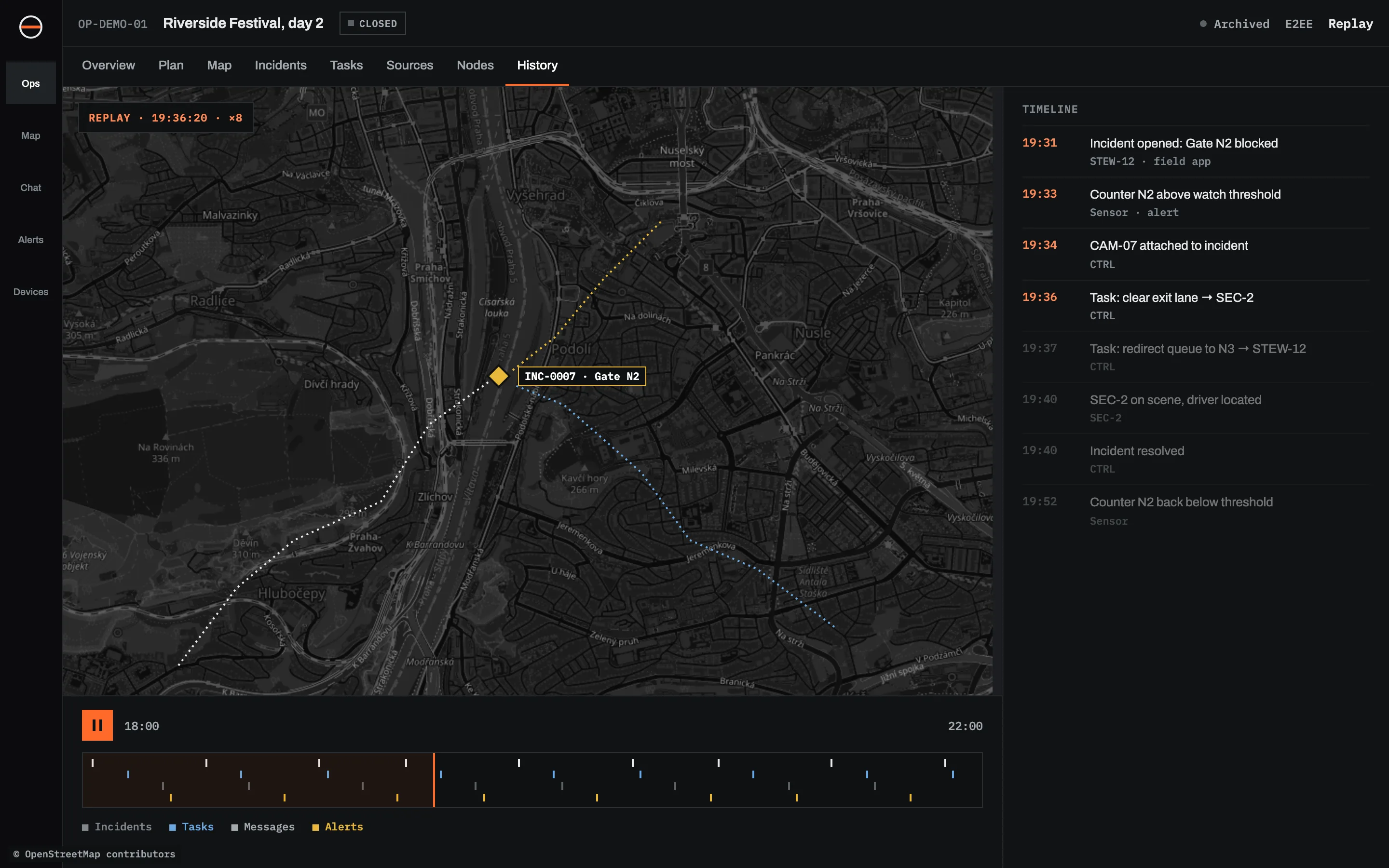
Replay of the closed demo festival operation: the map at 19:36 with incident INC-0007 and the tracks of the teams, a playback bar from 18:00 to 22:00 and the timeline of the incident on the right.
Replay of a closed operation. Demo data.
07 / BETWEEN OPERATIONS

Most of the work happens on the days nothing is happening.

Sinkaos also holds what you prepare in between: the map of your sites, the people who are qualified, the kit that's ready, and what you learned last time.

A map that outlasts the operation
Your sites, buildings and floor plans, sensors and cameras in one persistent atlas. Copy an area into an operation when you need it.
Indoors, floor by floor
Import floor plans, mark rooms, doors and stairs, and route from the street to a room on the third floor.
Plans with a plan B
Alternative plans and segments, decision points tied to real conditions, and a rehearsal that shows which still hold when a road closes.
Training that repeats
Turn a real plan into an exercise, run one part again and again, and track qualifications and renewals.
Equipment and vehicles
What you have, where it should be, where it is, whether it works, and which vehicle it is riding in.
People and rosters
Connect your volunteer or staff system, see who is qualified and available, and approve a suggested roster.
Debrief and lessons
Findings tied to evidence, lessons with owners, and improvements that flow back into plans and training.
Optional AI help
Summaries, what changed while you were offline, and suggested records. Off by default, and you choose the model.
See every capability →
08 / WHO IT'S FOR

Teams that work outdoors, under time pressure, often with people they met that morning.

EARLY ACCESS

Got an exercise or event coming up? Run it on Sinkaos.

We'd rather work closely with a few teams using it for real than collect a long list of sign-ups. If you have something planned in the next few months, tell us about it.

YOU GET
Free use during early access
Help setting up your first operation
A direct line to the people building it
Your feedback shaping the product
WE ASK
Use it in a real exercise, event or shift
A 30-minute call afterwards
Honest feedback, especially the bad kind