Incident logging that survives the shift change.
Incident logging in Sinkaos turns every report into a record with a place, a severity, an owner and a history. When the night shift hands over at six in the morning, the incoming lead reads open incidents and their timelines, and does not have to reconstruct the night from a chat.
The log is in three places, and the handover is in someone’s head.
During a long response the record is split. Some of it is in the paper log at the command post, some in a group chat, some on the whiteboard, and the rest in the memory of whoever was on the radio. At handover the outgoing lead talks for ten minutes, the incoming lead takes notes, and half the detail is lost by lunchtime.
Then the questions start. When exactly did the report about the cracked embankment arrive? Who was sent, and did they confirm? Which tasks are still open? If the answers depend on scrolling back through four hundred messages, the next shift is working from a guess.
One night of a flood response, and the handover at six.
-
22:40A report becomes a recordA volunteer sends a photo of water over a footpath in the operation chat. The operator turns the message into an observation with one action. It keeps a link back to the message, its position and the photo.ObservationsFrom a message
-
23:15It escalates to an incidentA second report of seepage at the embankment arrives. The operator opens an incident with severity, an owner and both observations as evidence, and assigns two tasks: check the embankment, close the footpath.IncidentsTasksEvidence
-
01:50A late report lands in the right placeA patrol in a dead zone recorded a crack at 01:05. It arrives at 01:50 and goes onto the timeline at 01:05, marked as late, next to the river gauge reading from that moment.Two clocksSync
-
05:45The handover starts from the recordThe outgoing lead opens a saved view of open incidents and unacknowledged tasks in the area. She and the incoming lead go through each incident’s timeline together, and owners are reassigned to the day shift.Saved viewsOwnersTimeline
-
06:10Nothing depends on memoryIf the morning briefing needs a summary of the night, an optional AI summary of the time window is drafted from the record. A person checks it before it goes anywhere.Optional AISummary
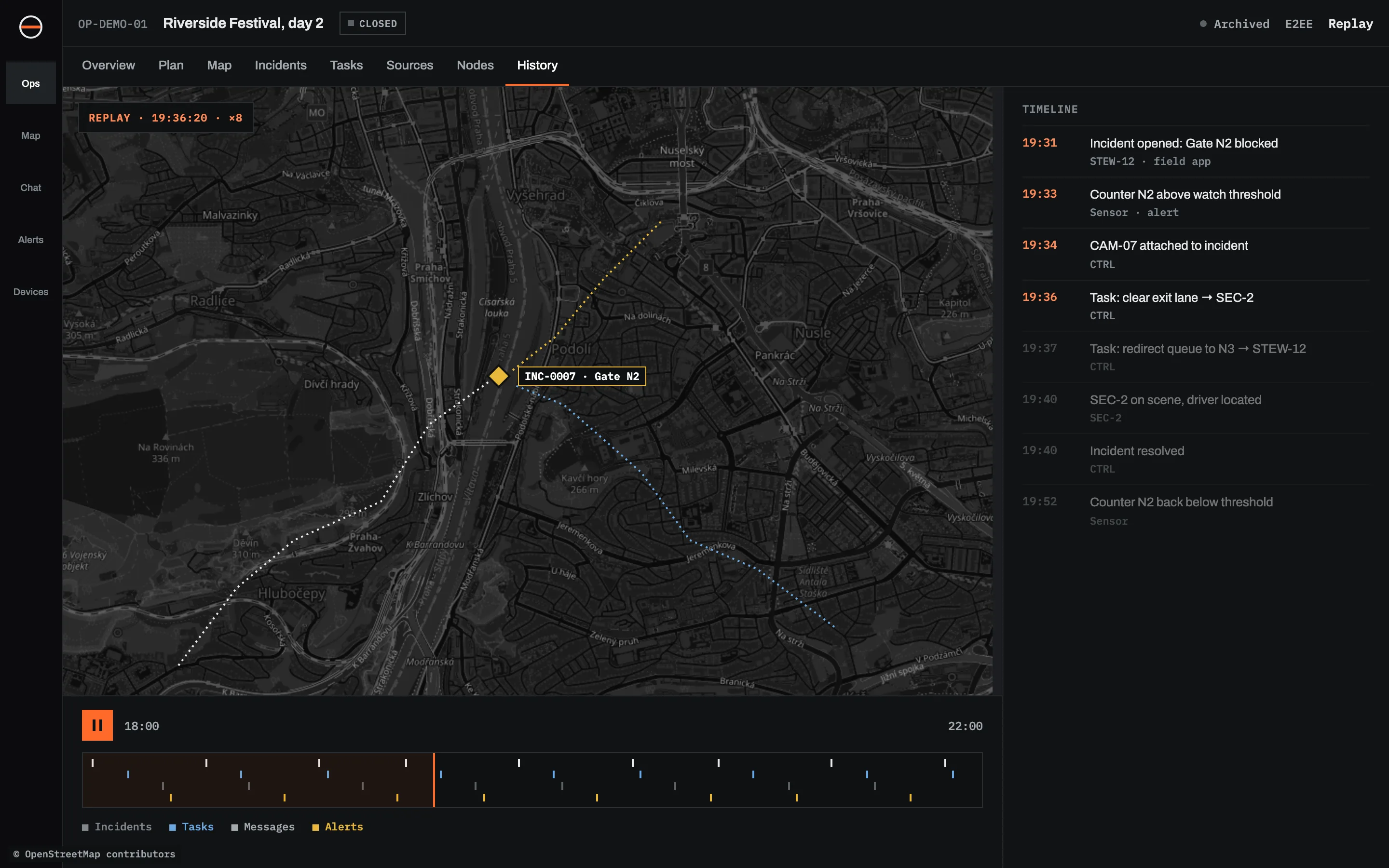
An incident log built from records, not scrollback.
Typed records
Every incident, task, place, person or vehicle has a stable identity, a history and links to related records.
Observations with confidence
Fast field reports with a photo, position, source and confidence, marked as verified or disputed.
Incidents from anywhere
Created by hand or from a message, report, alert or sensor, with severity, owner, workflow and evidence.
Tasks that get acknowledged
Assigned, prioritised and placed on the map, with checklists, sub-tasks and acknowledgement.
Your own forms
Conditional fields, validation, calculations, signatures and photos, so the log asks for what your procedures need.
Two clocks
When something happened and when it became known are kept apart.
Replay at any speed
See the picture at any moment, with gaps in the data shown honestly.
Export for the report
Records as GeoJSON, JSON or CSV, reports as PDF, and after-action packages with a checksum manifest.
What the incoming shift can check, and where.
| QUESTION | IN A CHAT OR PAPER LOG | IN SINKAOS |
|---|---|---|
| What is still open? | Read back and guess | Saved view of open incidents and tasks |
| Who owns it? | If someone wrote it down | Owner on every incident and task |
| When did it actually happen? | Time the message arrived | Time it happened and time it became known |
| Where exactly? | A street name or a description | Position on the map, with photos |
| What has changed since? | Ask around | History of every record |
| What did the sensors say then? | Usually lost | Replay with live data from that moment |
What incident logging in Sinkaos does not do.
Where teams keep their log in Sinkaos.
Questions about the log and handovers.
Can we turn chat messages into log entries?
How does shift handover work?
Can we use our own incident forms?
What happens to reports written offline?
Can we use the log for a debrief?
Who can change an entry?
Try it on your next operation.
Early access is free. We set up the first operation with you and stay close while you use it.