Emergency planning for councils, with one picture for the incident room and the street.
When the river rises or the power goes, a council’s emergency response team has to know what is happening across the whole area. Sinkaos puts the incident team, highways and street crews, community flood wardens and volunteers on one live map, with tasks and a record that keep working when the mobile network does not.
The incident team sits in one room. The emergency is everywhere else.
In a district council the response is usually run by the emergency planning officer, a duty director, people from housing, highways and communications, and a liaison officer from the town or parish council who knows every lane. In a town council it may be the clerk, two councillors and the flood wardens. They know the place well. What they rarely have is a shared, current picture of it: which roads are shut, where the sandbags went, who has checked on the elderly couple by the mill stream, which rest centre still has camp beds.
That picture gets pieced together from phone calls, a whiteboard and the loggist’s notes. Updates arrive out of order, and once the mobile network is overloaded or the power is down even the calls stop. People outside carry on without knowing what the room has decided.
Afterwards the Local Resilience Forum, the insurers, the lead local flood authority and the full council all want the same thing: what was known, when, and what was done about it. By then the answers are spread across five phones and a flipchart.
A flood day in a market town of 6,000 people.
-
05:40The warning comes inA Met Office rain warning and the upstream river gauge both sit as live sources in the town’s standing operation. The gauge crosses the level your plan treats as a trigger and an alert opens for the incident team.Official warningsSensorsAlerts
-
06:15The council stands up its responseThe operation already holds flood zones, evacuation routes, rest centre locations and the contact list from the emergency plan. Team members open it on their phones on the way in.TemplatesRolesLayers
-
07:00Crews go out with their own tasksHighways get the road closure at the bridge, the street team clears gullies, two council officers start door-knocking in the lower street. Each task sits on the map with an owner and a time it is due.TasksAcknowledgementLive location
-
08:20Volunteers join without accountsTwenty residents turn up at the town hall to help. They scan a QR code and join this operation only, as helpers, seeing just the sandbag points and their own jobs.Guest accessRoles
-
10:45The lower street loses signalThe door-knocking team keeps logging who is staying, who has left and who needs transport. Their reports wait on the phones and land on the timeline at the time they were written.OfflineObservationsTwo timestamps
-
18:00Situation report to the LRFThe team exports the day’s timeline, open tasks and map as a PDF for the multi-agency coordinating group and as the starting point for the recovery report.TimelineExport
What changes for the incident room and the people outside.
A standing operation for your area
Flood zones, evacuation routes, rest centres, water sources and vulnerable sites are on the map before anything happens. A template or the last exercise becomes today’s operation in a few minutes.
Tasks in place of ringing round
Every job has a place, an owner, a due time and an acknowledgement, so the room can see what is still open.
Reports with a photo and a position
Anyone in the field can log a blocked culvert or a resident who needs help. It becomes a record the team can act on and find again the next morning.
Works on a weak signal or none
Maps, tasks and the team list are on each phone. Reports queue and send when there is a link. A laptop field node can run the operation over local Wi-Fi with no internet at all.
Live context on the same map
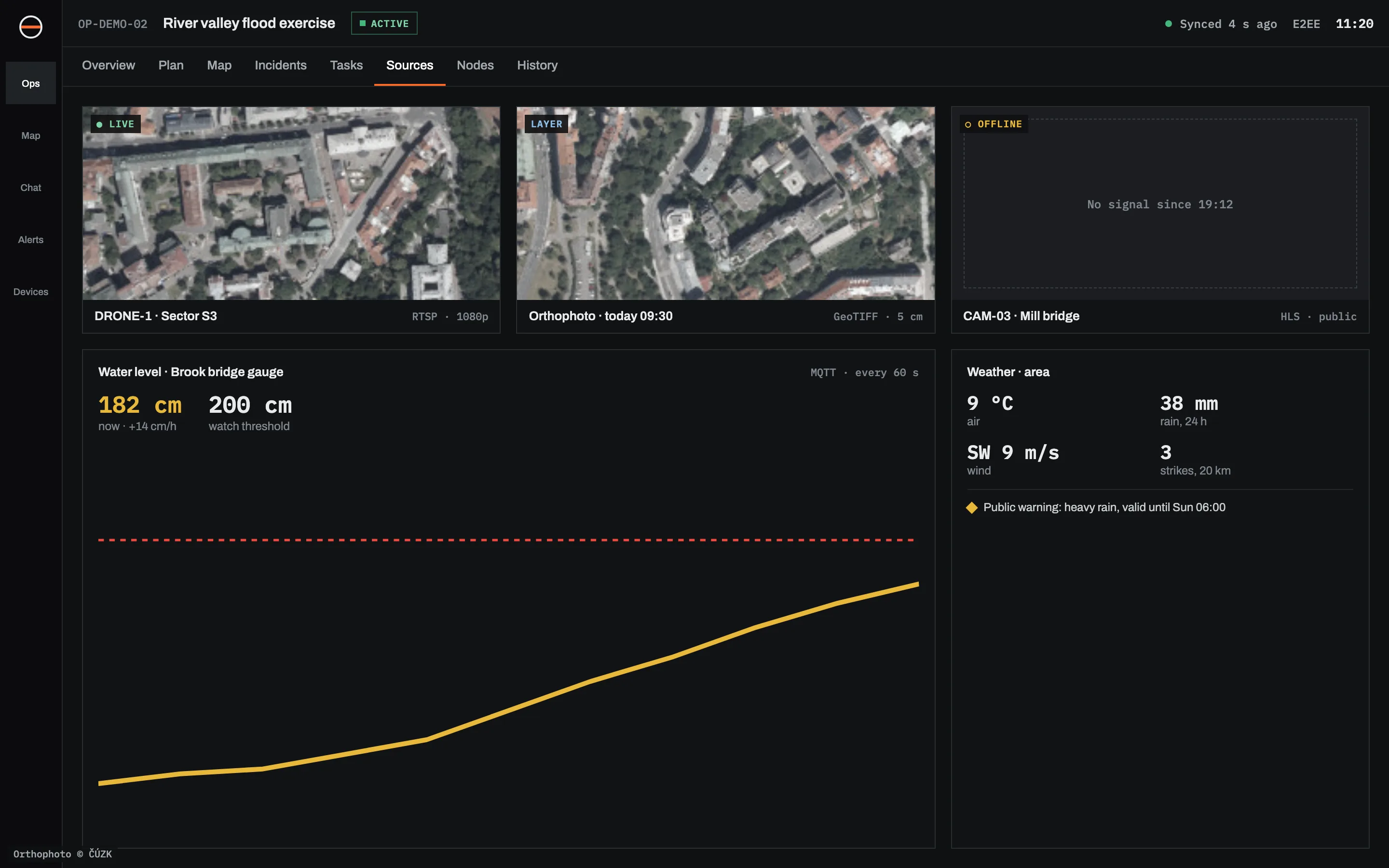
Weather warnings, river gauges, road closures and cameras sit next to your people, and gauges can raise alerts at the trigger levels in your flood plan.
Partners for one incident only
Residents, a neighbouring council or a charity join by link or QR code with a limited role. Their access ends when the operation closes.
A record you can report from
Every report keeps the time it happened and the time it arrived. Replay the day, export the timeline and build the debrief from facts.
Your data, your rules
Hosted in the EU, on your own servers or on a disconnected node. Messages and files are end-to-end encrypted. Details on the security page.
One operation, a different view for each role.
What it leaves to others.
It does not warn the public
Sinkaos is not a public warning system. Emergency Alerts on mobile phones, Environment Agency flood warnings, local radio and your social channels stay as they are.
It is not emergency dispatch
Emergency calls go to 999 or 112 and the emergency services. Sinkaos coordinates your own people and does not take over the work of the blue light services.
It does not write your emergency plan
It holds the plan’s maps, contacts and task templates and makes them usable on the day. The plan itself stays yours, and our emergency plan guide can help with it.
It needs charged phones
Offline mode does nothing for a flat battery. Plan power banks and a charging point in the incident room.
What towns and districts run in it.
What councils usually ask us.
Do officers and volunteers need training?
Can we use it outside emergencies?
Can we share the picture with the LRF or the fire and rescue service?
Where is our data stored?
Does it replace our decision log?
Run your next emergency exercise on Sinkaos.
Tell us about your council and your next exercise. Early access is free, and we set up the first operation with you.