Civil-military cooperation without two separate maps
When soldiers deployed under military aid to the civil authorities, police officers, firefighters and volunteers work in the same flooded valley, each group usually brings its own tools and its own picture. Sinkaos lets civilian teams share positions, markers and incidents with military and police TAK users, read APP-6 symbols and pass MGRS coordinates, while each side keeps control of what it shares.
Same valley, same job, separate pictures.
A Royal Engineers detachment arrives under a MACA request with its own devices, its own symbols and a grid reference format nobody in the council’s incident room uses. Police run their own channel and the volunteers coordinate in a chat group, while the coordinating group tries to stitch it together from phone calls and liaison officers’ notes.
The result is familiar to anyone who has taken part in a joint exercise or a real deployment: positions read out over the radio and plotted by hand, the same incident reported three times under three names, and nobody sure whether the bridge the soldiers reported closed is the same one the volunteers are about to drive across.
A flood response with military aid in support, from first light to handover.
-
06:00The council’s incident team opens the operationArea of interest, sectors along the river, assembly points and evacuation routes. The military liaison officer joins as a time-limited guest with a role that sees the whole picture but cannot edit civilian records.OperationGuests
-
07:30The unit’s TAK devices appear on the mapPositions and markers from the unit’s ATAK phones arrive through Cursor on Target and are shown with their APP-6 symbols, next to the civilian teams’ own symbols. The soldiers see the civilian teams in their TAK apps too.Cursor on TargetAPP-6
-
09:10A volunteer reports a breached leveePhoto, position and severity from a phone with weak signal. The report becomes an incident in Sinkaos and appears in the soldiers’ TAK apps, so the engineering section can plan a response without a radio relay.IncidentsOffline
-
11:20A grid reference comes in by radioThe coordinator types the MGRS reference read out by the unit, Sinkaos plots it, and the closure is drawn as a no-go area that changes routes for every team.MGRSRoutes
-
15:00Some information stays civilianHandling labels keep the list of evacuated residents and their medical notes out of anything shared with partners. What crosses over is positions, markers and incidents the incident team has chosen to share.Handling labelsPermissions
-
20:00Handover and debriefThe guest role expires with the operation. The timeline, with civilian and military positions and every incident, is exported for the joint after-action review.ReplayExport
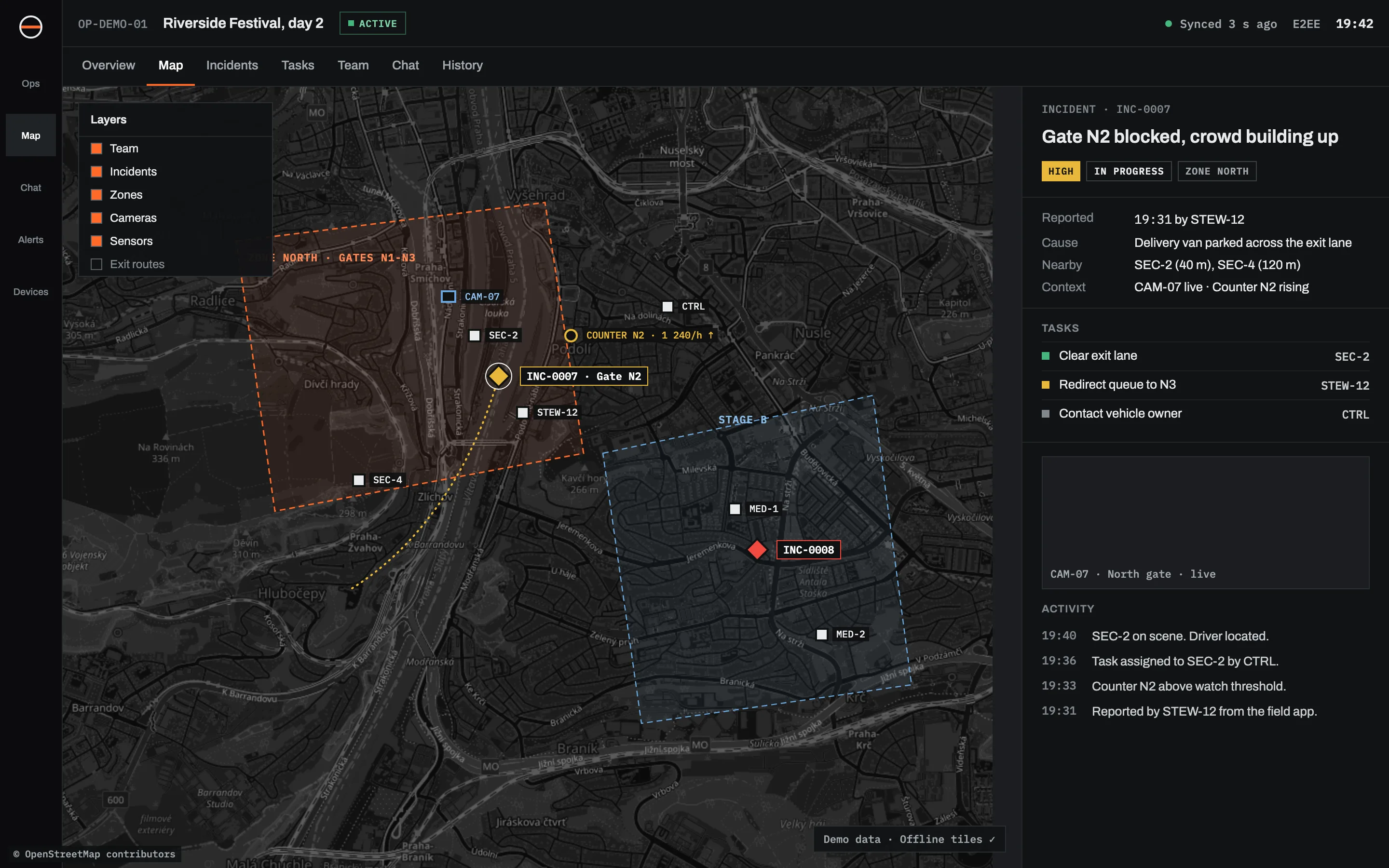
Built for civilian teams who work next to uniforms.
APP-6 military symbology
Place, show, filter and export units, equipment, installations, activities and tactical graphics with APP-6 symbols (NATO Joint Military Symbology, promulgated by STANAG 2019), next to civilian symbols.
Cursor on Target with TAK
Two-way exchange of positions, markers and incidents with ATAK, WinTAK and iTAK and with TAK servers, so civilian teams and military or police TAK users see each other.
MGRS and other grids
MGRS, UTM and WGS 84, shown in the format each person prefers. Paste a grid reference and it lands on the map.
Guests with an end date
Liaison officers and partner units join one operation by link or QR code, see what their role allows and lose access when the operation closes.
Control over what crosses
Handling labels and permissions restrict what is shared, exported or shown in notifications, so sensitive civilian data stays inside.
Works when the network does not
Offline maps and mission packs on every phone, and a local field server that runs the operation with no internet and syncs later.
Open formats
KML, GeoJSON, GPX, CAP and WMS/WMTS for overlays, warnings and maps exchanged with partners.
One record afterwards
A replayable timeline of positions, incidents, tasks and decisions for the joint after-action review.
What moves between Sinkaos and TAK apps
Cursor on Target is the message format TAK apps use for positions and points. Sinkaos speaks it in both directions.
| DATA | SINKAOS TO TAK | TAK TO SINKAOS |
|---|---|---|
| Positions of people and teams | Yes | Yes |
| Markers and points of interest | Yes | Yes |
| Incidents | Yes | Yes |
What is shared in each operation is decided by its permissions and handling labels. For a fuller comparison see Sinkaos vs ATAK.
What it is not
No NATO certification
Sinkaos is not certified, accredited or approved by NATO or any armed force, and has not been through formal STANAG conformance testing.
No classified information
It is not built or accredited for classified information at any level, including NATO RESTRICTED. Use your accredited systems for that.
Not a military C2 system
It does not replace military command and control systems or federated mission networks. It connects civilian teams to the picture military users already share.
Not a replacement for radio
Radio is still the fastest way to say “stop”. Sinkaos keeps the positions, photos and records that never fit into a radio call.
Not an emergency dispatch system
It is not a certified dispatch or public warning system and does not replace emergency numbers or official warning channels.
Agreements come first
What civilians and the military may share is a matter for your agreements, the terms of the MACA request and the law. The software enforces your rules; it does not set them.
Situations with both on the ground
What civilian teams ask about working with the military
Do soldiers need to install Sinkaos?
Can we see APP-6 symbols without using them ourselves?
Is it approved for military use?
How does a council get military help in the first place?
What is CIMIC?
Can it run without internet in the field?
Planning a joint exercise?
Tell us who takes part and what the scenario is. If it fits, we set up the operation with you and stay close on the day.